Supplier Voluntary Self-Inspection, step by step
SVSI is moving from a Word-and-email process onto the ICW platform. One task covers one factory, and it runs through eight steps and four roles before that factory is allowed to inspect its own products. This page follows the designed screens in order. Every screen opens the real frame in Figma, and every ▶ button plays that part of the flow as a clickable Figma prototype.
Clickable prototype, by role
Start with the end-to-end path to see one factory go all the way through. Every screen carries a Lab / Buyer / Supplier switch in the top bar: it shows whose screen you are on, and clicking a role takes you to that role's home page if you get lost. The shorter flows below cover each role's alternatives, such as return, reject and revise. Dialogs open over the page; Cancel closes them.
End-to-end, everything approvedSet SVSI factory → Application → Invoice → Lab Audit → QT Review → Ethical Check → QT confirms, generates the documents & previews → Ethical (optional) → SVSI Team reviews once → Supplier signs → QT final review & completes. Switch role with the Lab / Buyer / Supplier chips in the top bar, or press →.Task status, by role
Each role sees its own status for the same task. Read across a row to see what QT, Supplier and Lab each see at that moment. A dash means that role does not see the task at that stage. The colour says whose move it is.
| Stage | QT · SVSI Team | Supplier | Lab |
|---|---|---|---|
| 01Factory invited to SVSI | Need to Start SVSI | Need to Start SVSI | — |
| 02Supplier submits; can still edit | Application Submitted | Application Submitted | — |
| 03QT opens the check form | Under Review | Under Review | — |
| 04QT returns it for correction | Application Returned | Application Returned | — |
| 05QT approves; invoice being issued | Pending Invoice | Pending Invoice | — |
| 06Invoice issued, waiting for payment | Pending Payment | Pending Payment | — |
| 07Paid; lab to book the audit | Pending Audit | In Progress | Pending Audit |
| 08Audit date confirmed; audit and report | Pending Audit | In Progress | In Progress |
| 09Lab uploads the report and result | Pending Audit | In Progress | In Progress - Upload Report & Result |
| 10Lab completes; QT confirms, generates the documents and previews | Result Review (QT) | In Progress | Audit Completed |
| 11QT asks for a revised report | Report Return | In Progress | Revise Report |
| 12Ethical team reviews (optional) | Result Review (Ethical) | In Progress | Audit Completed |
| 13SVSI team reviews once and comments on items | Result Review (SVSI) | In Progress | Audit Completed |
| 14Waiting for the supplier to sign | Pending Sign Off | Pending Sign Off | Audit Completed |
| 15Signed copies back; QT final review | Final Review (QT) | Final Review (QT) | Audit Completed |
| 16Task completed; validity goes live | Completed | Completed | Audit Completed |
| 17Application or task rejected | Rejected | Rejected | — |
Before the task exists
SVSI applies to a factory, not a supplier. So the buyer starts from the supplier list, expands a supplier to see the factories underneath it, and decides which of those factories are in scope. Adding a factory to SVSI puts it at Not Rated; the scheme is set after the audit. Factories that will never join are marked Out of Scope.
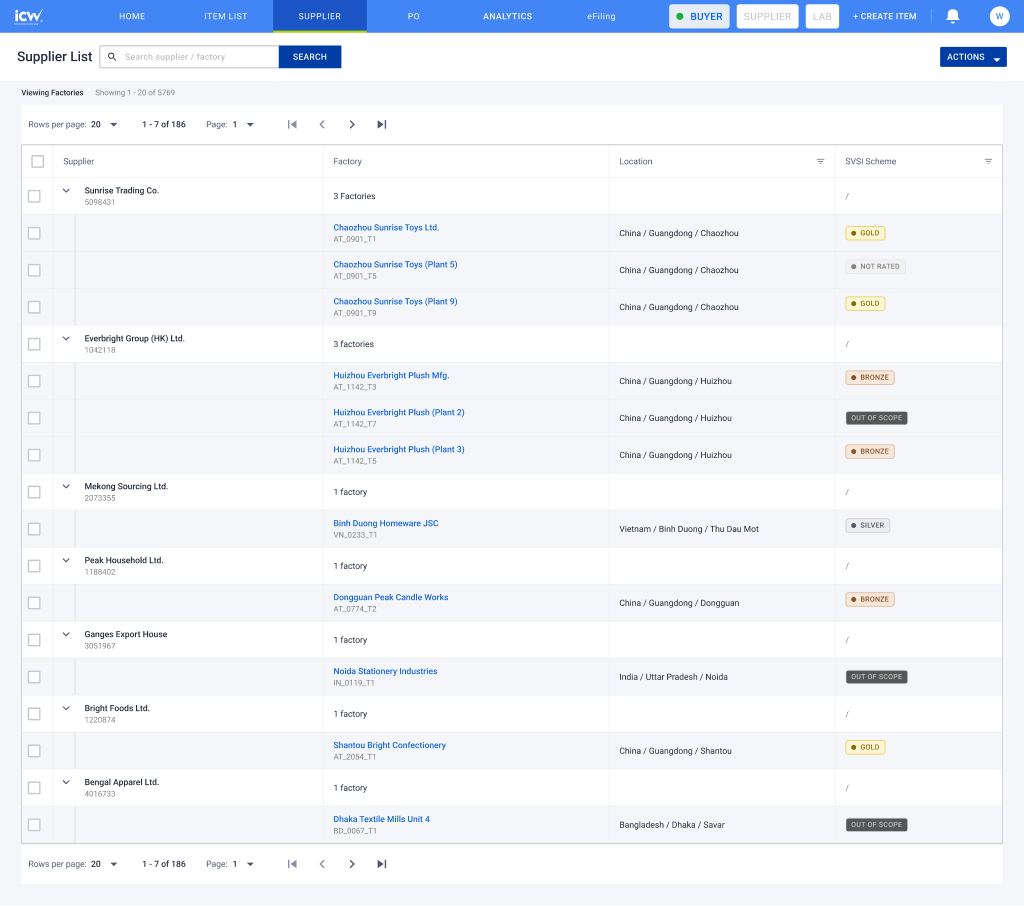
Supplier list, expanded
Each supplier row opens to the factories under it. Every factory carries its own SVSI scheme chip, and the scheme tabs filter the list by tier.
Open in Figma 530:3455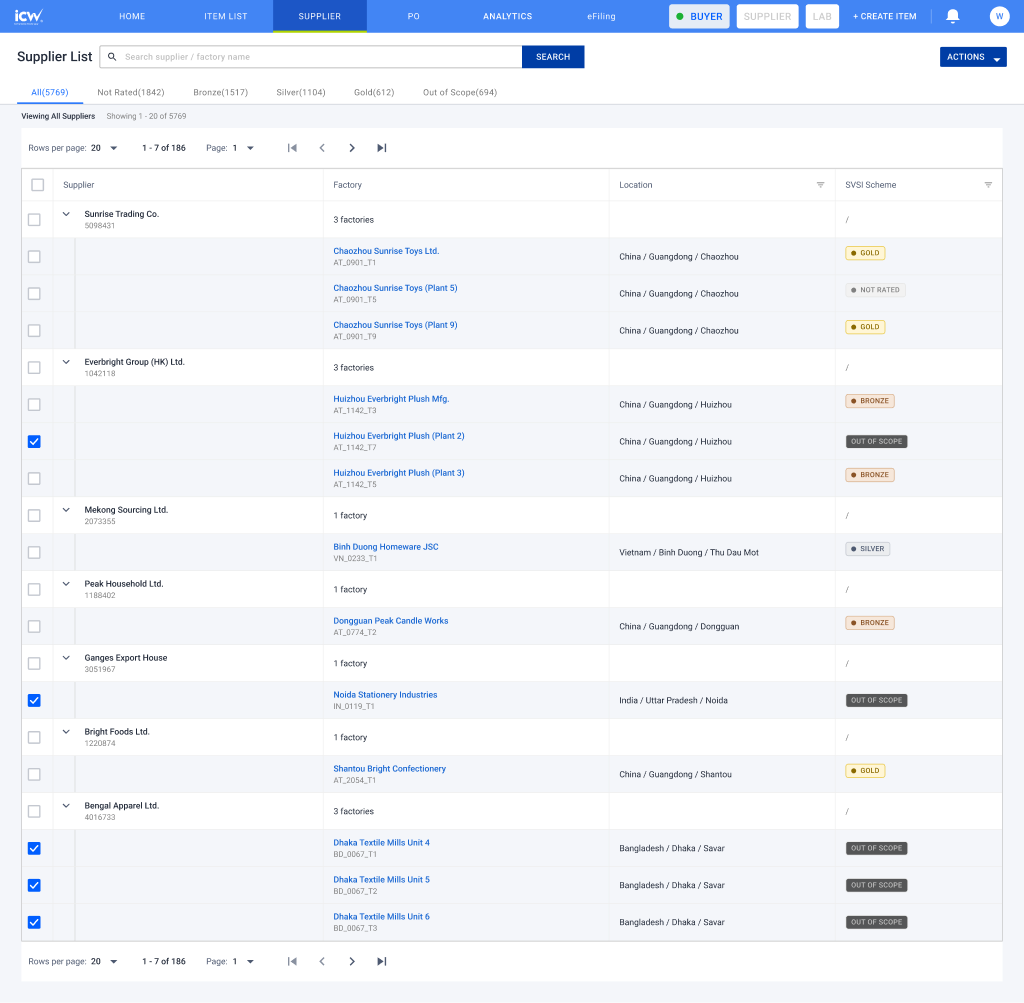
Add to or remove from SVSI
Bulk-select factories, then use Actions. Adding confirms first and lands every factory at NOT RATED; removing moves it to OUT OF SCOPE.
Application
The supplier starts the application themselves. This is the part that used to be the Word Application Form v4. They confirm the factory, run a self-assessment, pick the items the factory wants to self-inspect, and give payer details. The buyer then reviews the whole submission and either approves it, returns it for correction, or rejects it.
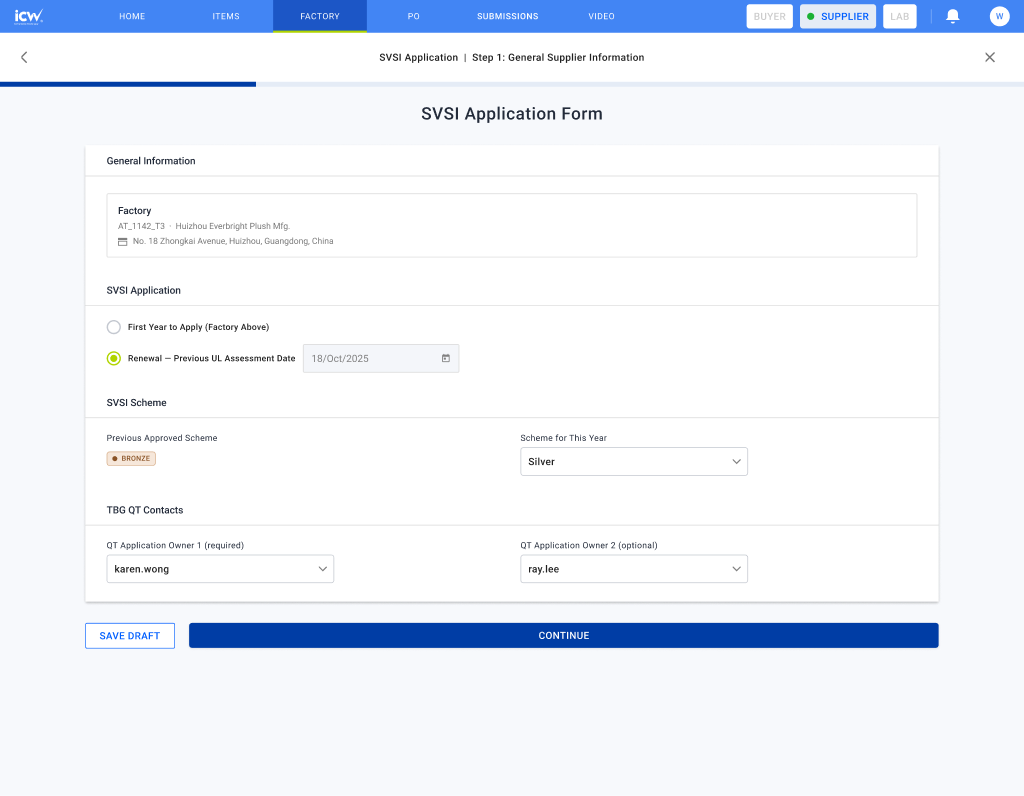
Part 1, factory & contact
First-year applicants give the full factory record. Renewals carry most of it forward.
Open in Figma 140:166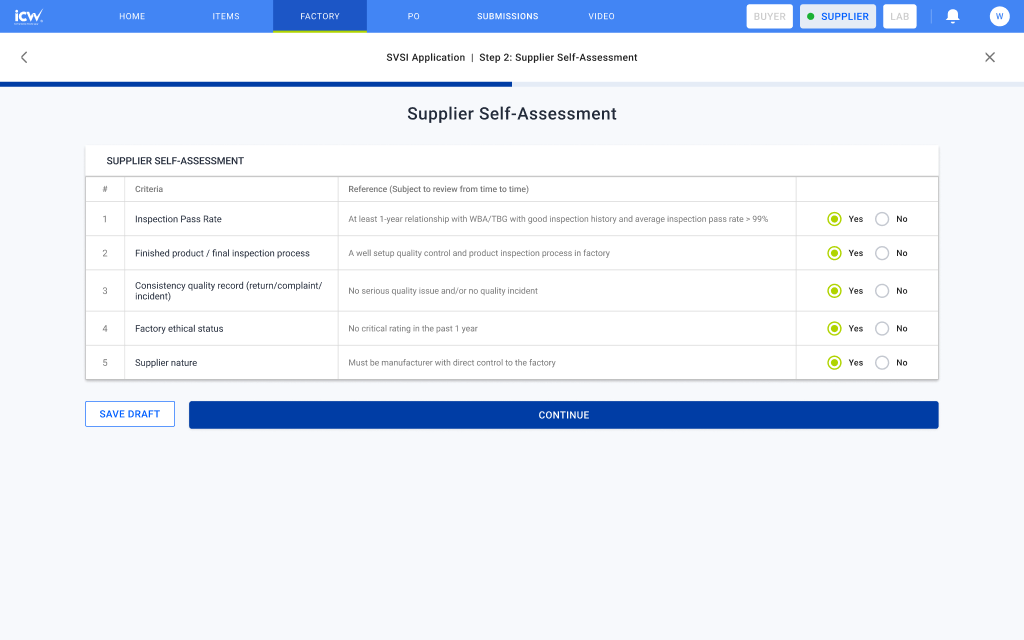
Self-assessment
The factory declares it meets the entry criteria. A "not met" answer blocks the application there rather than later.
Open in Figma 144:165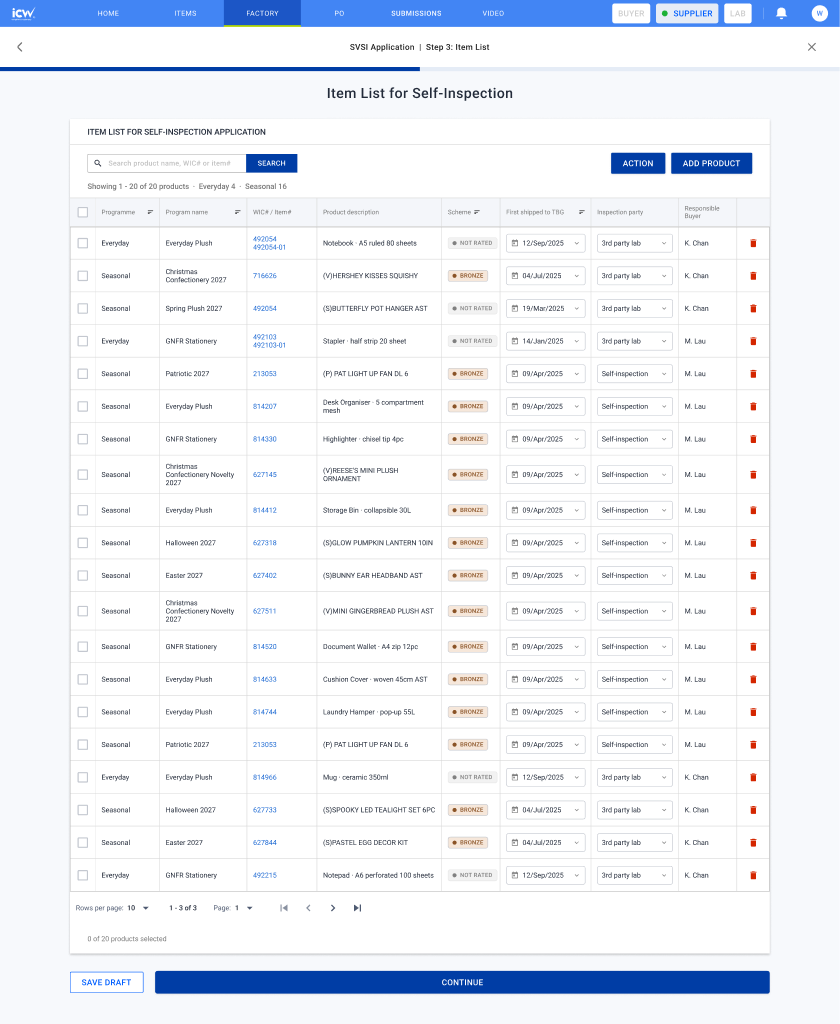
Item list
Products are added from a dialog. Per row: first shipped date and who inspects, self-inspection or a third-party lab. Several rows can be filled at once with bulk actions.
Open in Figma 2534:7740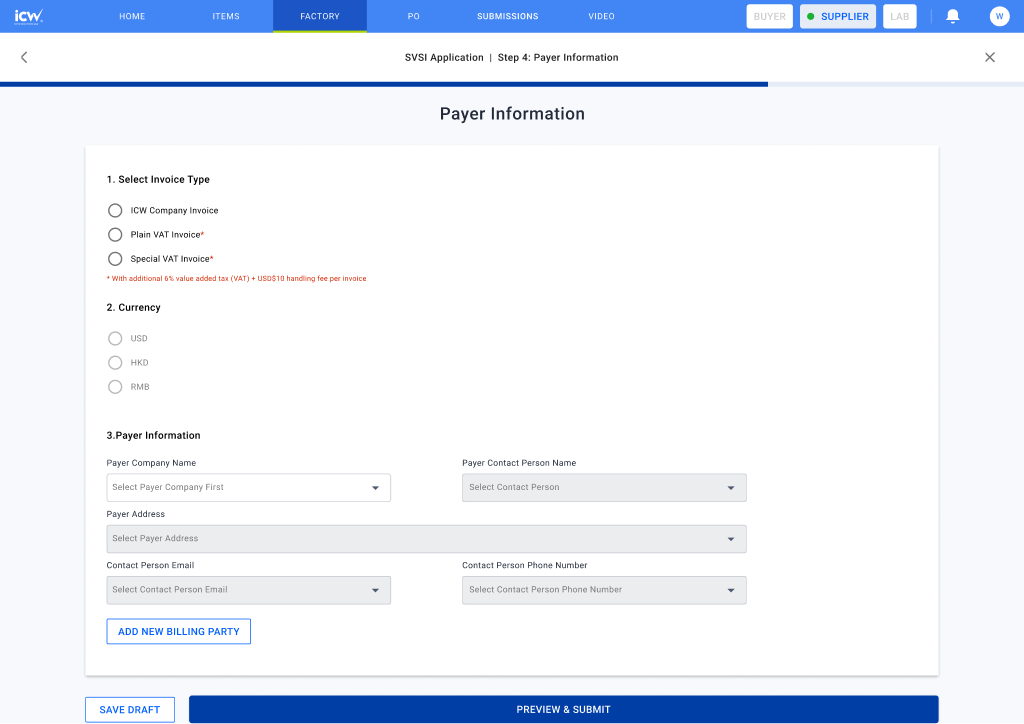
Payer information
Replaces the Payer Information Form doc. ICW bills the supplier on TBGASL's behalf, so this has to be right before the invoice is raised.
Open in Figma 147:162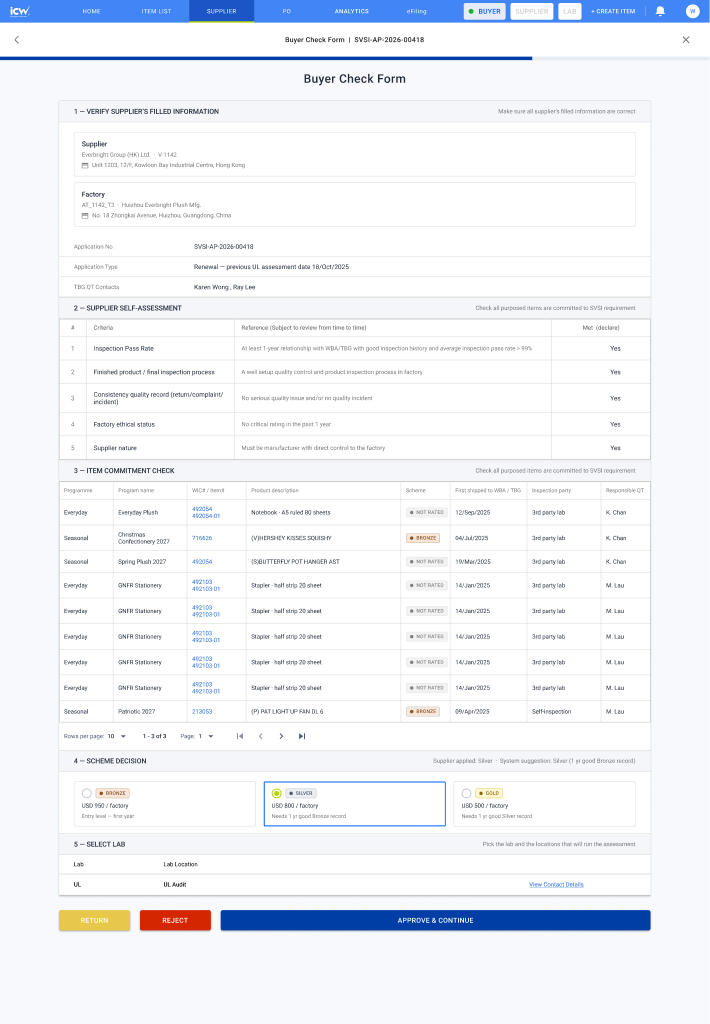
QT check form
QT reads the whole submission on one page and decides: approve and continue, return, or reject.
Open in Figma 149:162- Item list, nothing added yet2532:7007
- Add product dialog2536:7173
- Bulk action menu3331:12973
- Bulk fill, ship date3331:13503
- Bulk fill, inspection party3331:14033
- Self-assessment, criteria not met144:336
- Preview before submit2556:24543
- Application submitted2556:23682
- Returned to the supplier for correction1043:21409
- Rejected by the SVSI team1043:21574
Invoice
The fee depends on the tier being applied for. The invoice reads Bronze · USD 950 / factory, so Scheme / Fee is known from this step onward, well before any tier is awarded. Payment must clear before the assessment starts; fees are non-refundable even if the application is later refused.
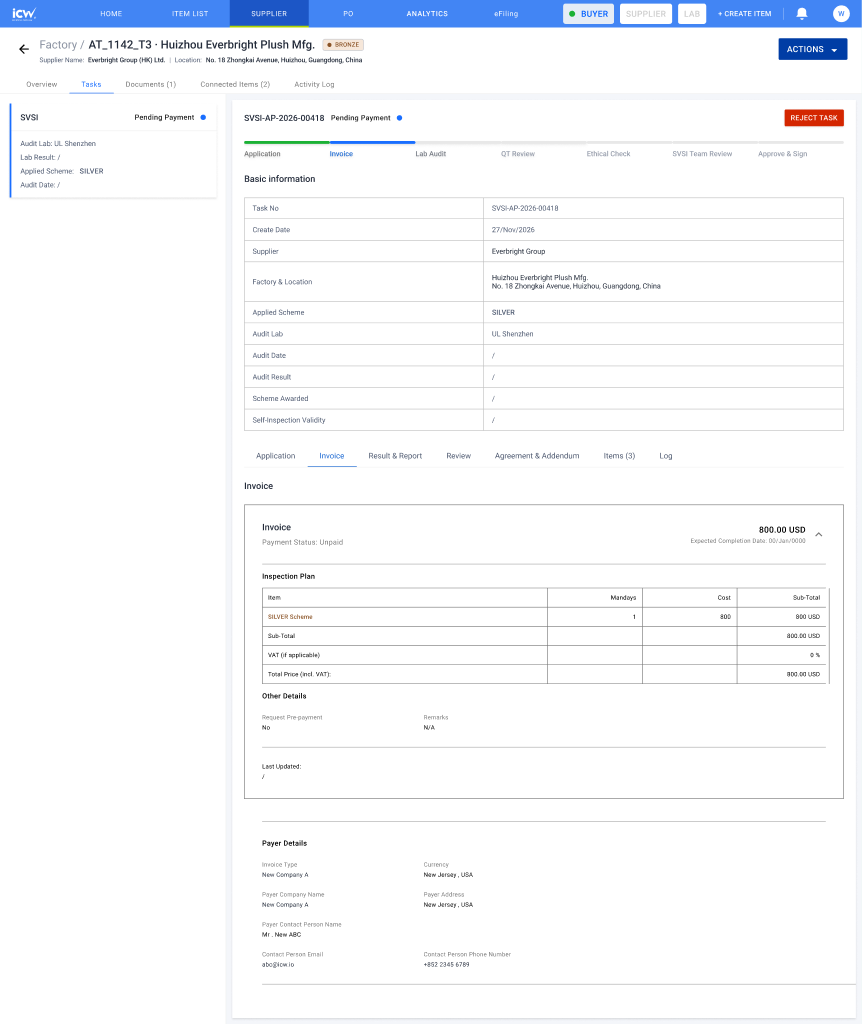
Invoice, pending payment
Task basic information on top, invoice details and the priced inspection plan below. One factory, one line.
Open in Figma 1189:30008Lab Audit
The lab has its own view with its own lifecycle: Pending Audit → In Progress → In Progress - Upload Report & Result → Audit Completed. They confirm the audit date, run the on-site factory assessment, then upload the report with both an audit result and an inspection result. Findings are optional: Major NC, Minor NC and Observation / OFI entries are added only if there are any.
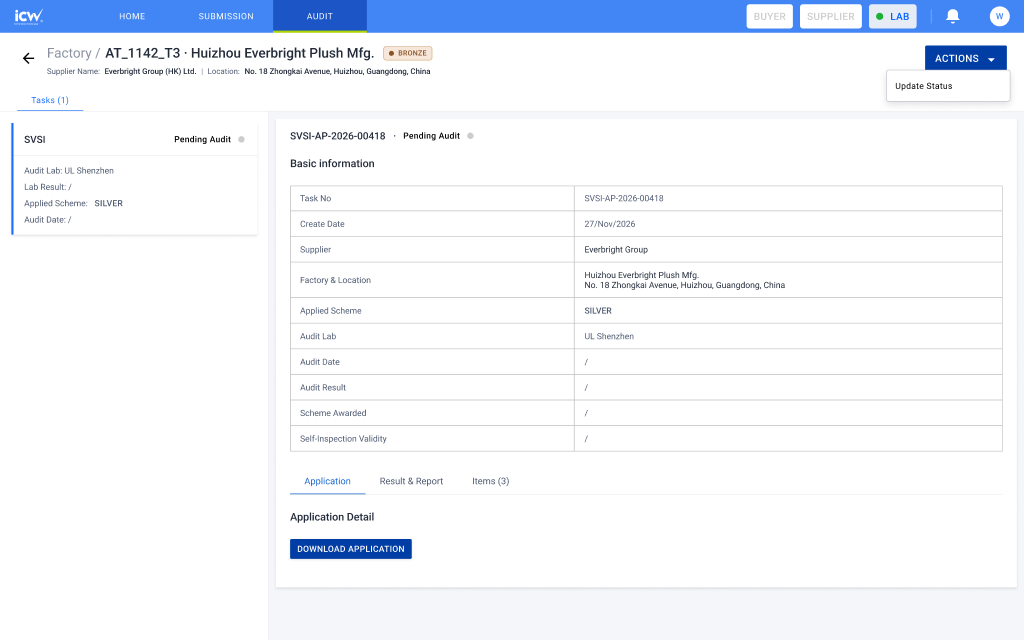
Lab task detail
The lab's working screen for one factory audit task. Actions opens Update Status.
Open in Figma 3012:40666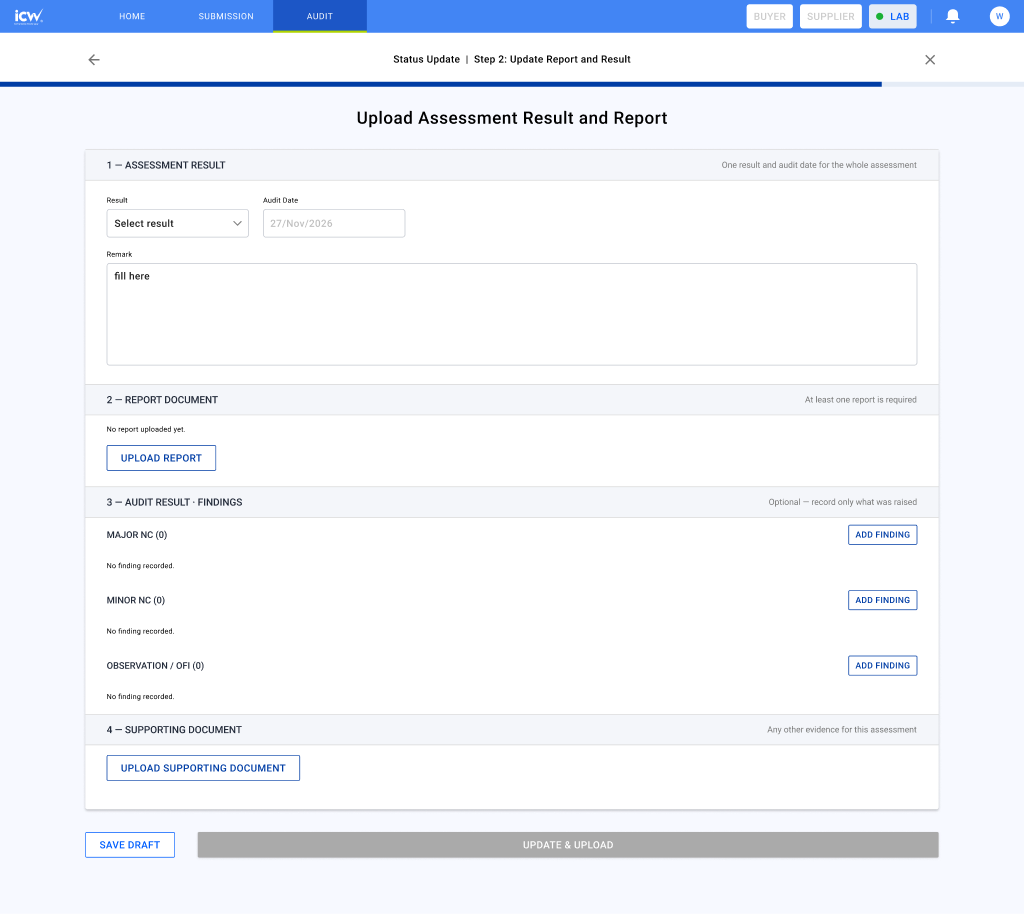
Upload result & report
Empty state first. Update & Upload stays disabled until a result is chosen. Audit data is entered once, not re-keyed per report.
Open in Figma 1390:4580QT Review, Documents & Preview
QT reads the lab's report and result. If it needs work, QT requests a revised report or rejects the task. Otherwise QT does everything in one pass: confirms the result with a remark and the item list, fills the Agreement and Addendum in one step (parties, factory, dates and sign information), then previews all of it before sending. Three steps in one dialog: Remark and items → Agreement & Addendum → Preview. From the preview QT sends the task either straight to the SVSI team or to the ethical team first.
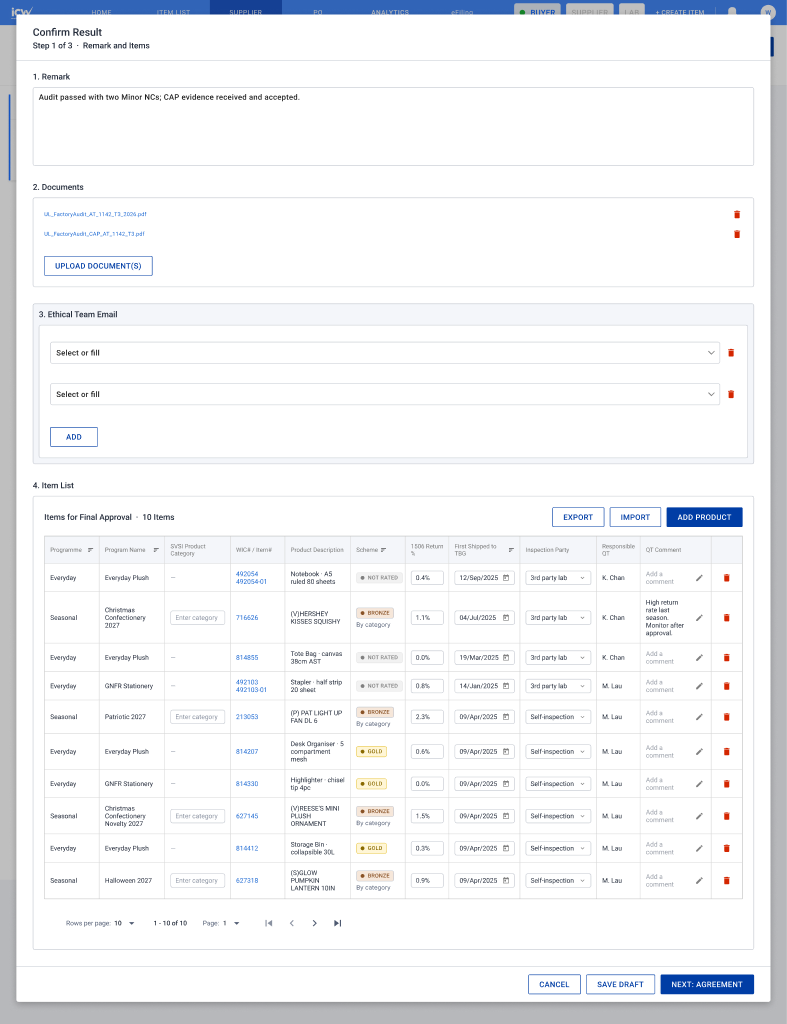
Confirm result
Remark, documents and the items for final approval in one dialog. QT fills 1506 return %, first shipped date, inspection party and the SVSI product category for seasonal items.
Open in Figma 4990:22447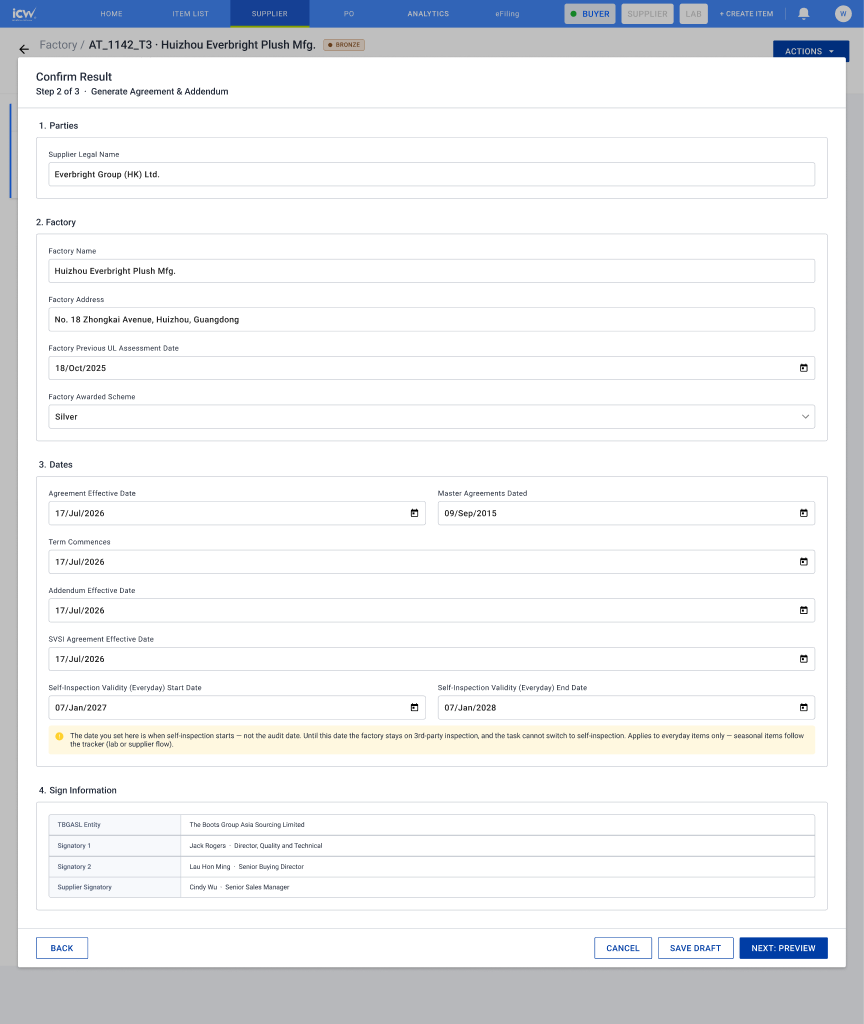
Generate Agreement & Addendum
One form for both documents: parties, factory, dates and sign information. TBGASL signatories are fixed; the supplier signatory is filled in.
Open in Figma 4990:23021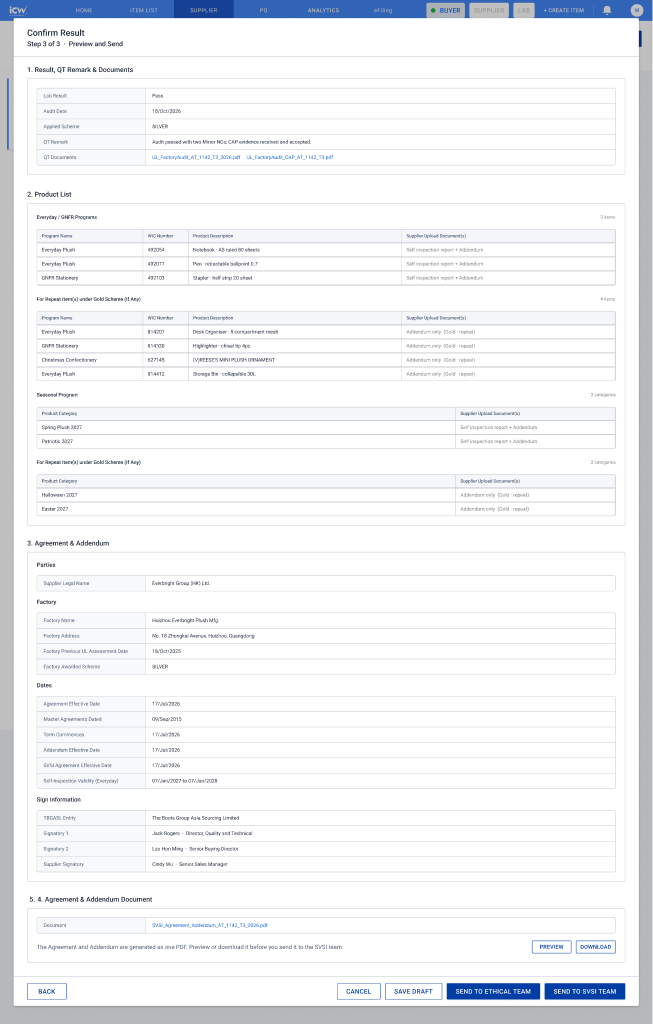
Preview, then send
Result and remark, the Addendum product list, the Agreement & Addendum details, and the generated PDF to preview or download. Send to the ethical team, or straight to the SVSI team.
Open in Figma 5415:45423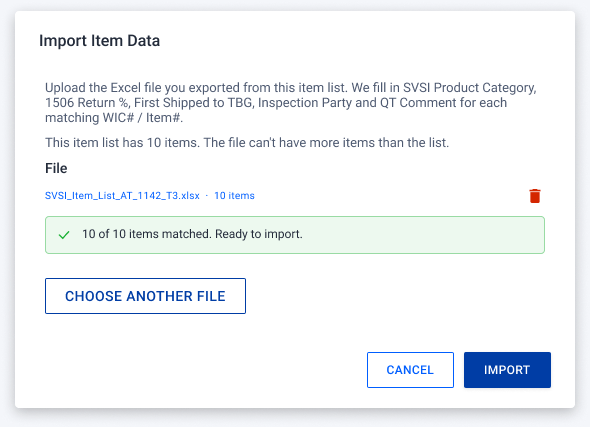
Export & import item data
For long item lists, QT exports the table to Excel, fills SVSI product category, 1506 return %, first shipped to TBG, inspection party and QT comment offline, then imports it back. The file can't have more items than the list; if it does, an error alert blocks the import.
Open in Figma 5453:23476Ethical Check (optional)
The ethical check is now optional. QT can skip it and send straight to the SVSI team; while the SVSI team is reviewing, QT can still send the task to the ethical team. If it goes to the ethical team first, they enter the score, score date, remark and documents, reconfirm, and the task moves on to the SVSI team.
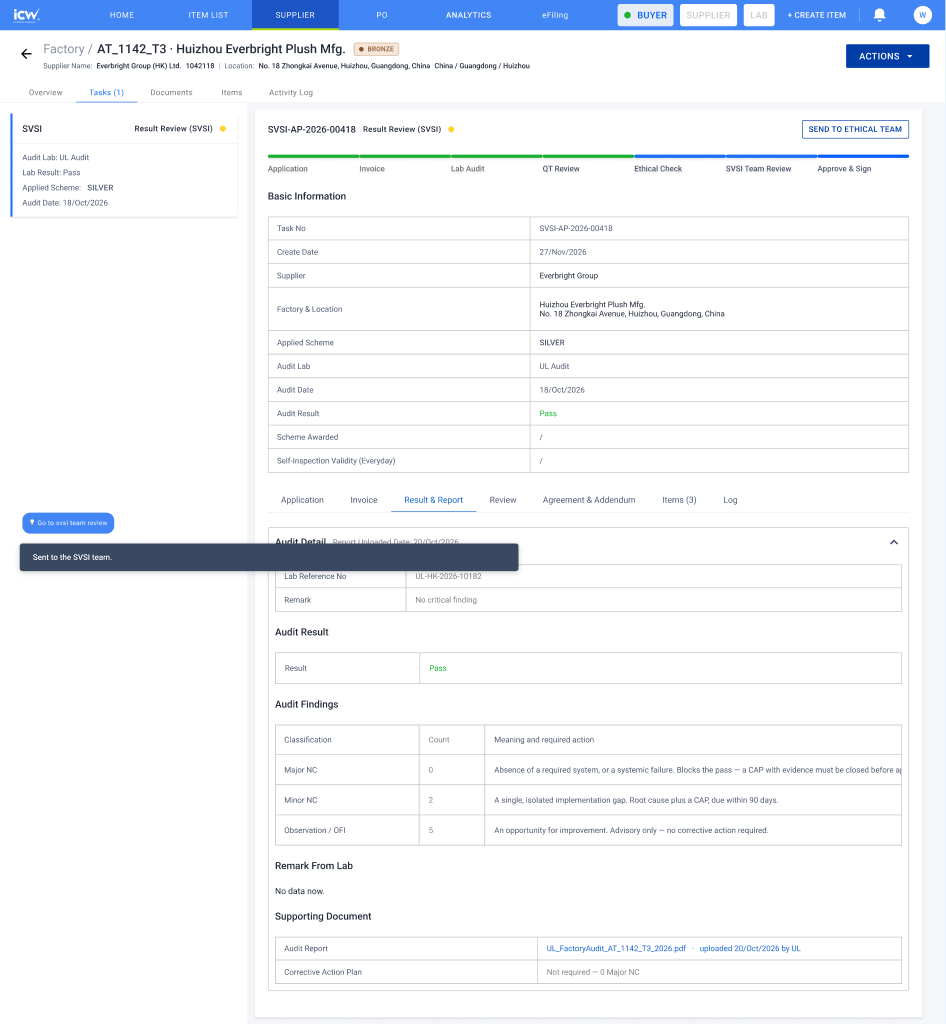
Sent straight to the SVSI team
Status Result Review (SVSI). QT still has Send to Ethical Team on the task.
Open in Figma 4976:22746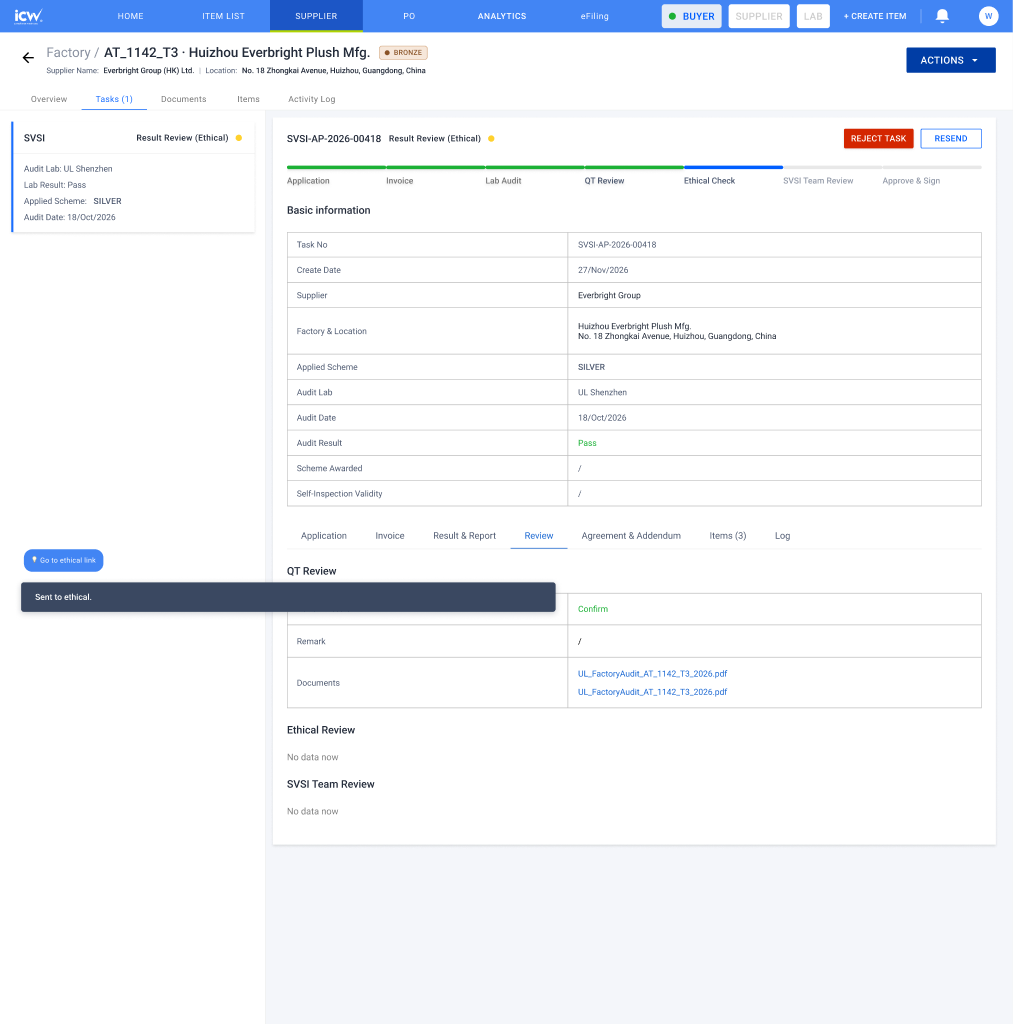
Sent to the ethical team first
Status Result Review (Ethical) until the ethical team submits.
Open in Figma 4976:23042SVSI Team Review
The SVSI team approves once. They see everything QT prepared and can return the task to QT or to the ethical team, or reject it. When they confirm, a preview shows QT's remark, documents, item list, Agreement and Addendum. If something is off, they leave a comment on the item (visible to QT only) instead of sending it back; for long lists the comments can be exported to Excel and imported back. Confirming sends the documents to the supplier.
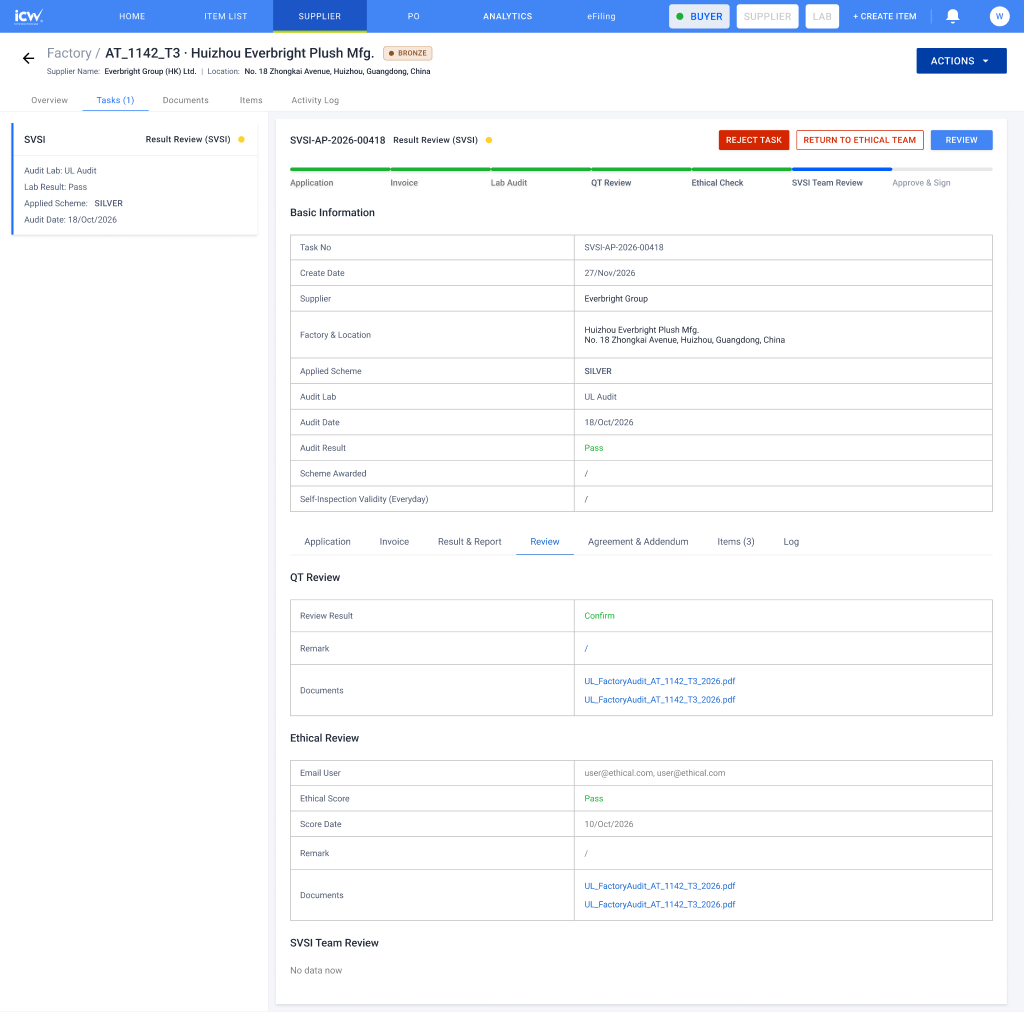
Result review
Reject task, return to QT, return to ethical team, or open the preview to confirm.
Open in Figma 1603:18989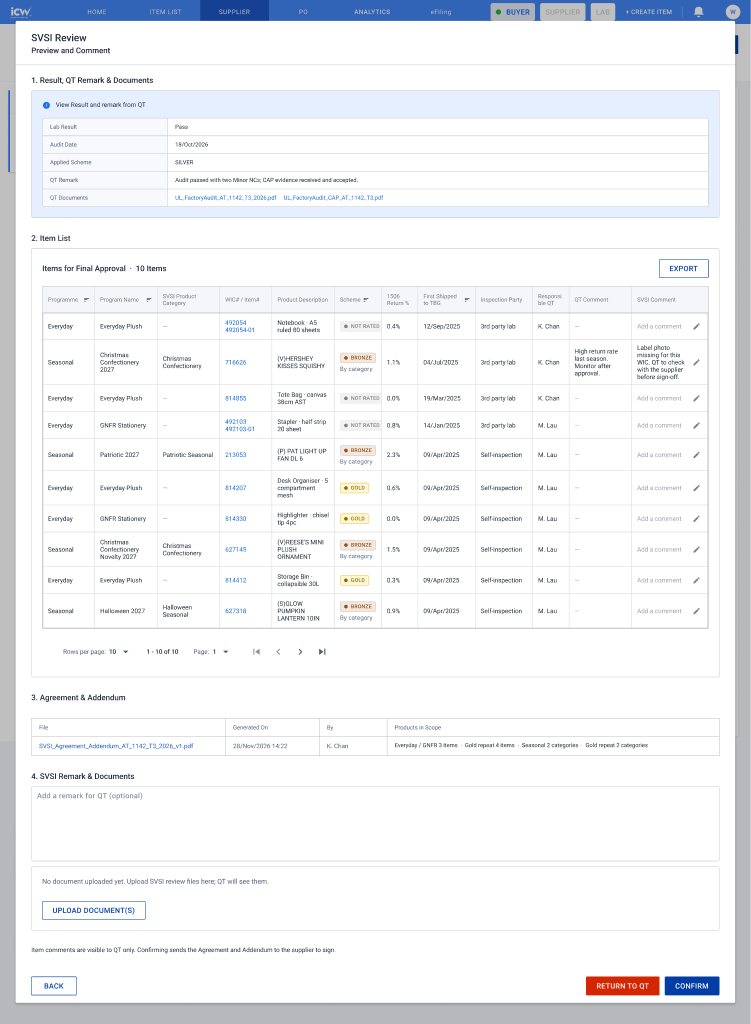
Preview & comment
Same preview as QT, read-only, with an SVSI comment per item and a place for the SVSI team's own remark and documents.
Open in Figma 4976:23490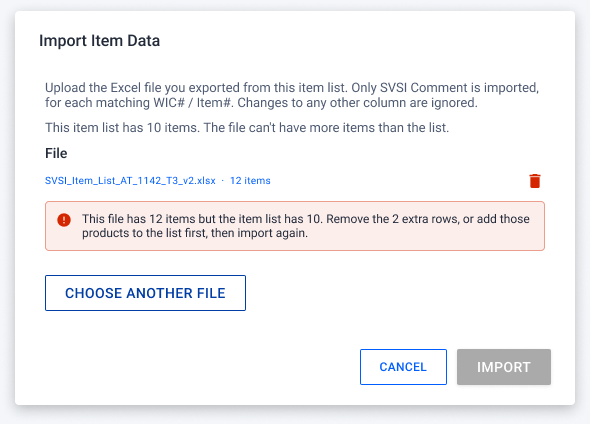
Export & import comments
Same Export / Import pop-up as QT, but only SVSI Comment is imported; changes to any other column are ignored by the backend. Same rule on row count.
Open in Figma 5461:25722Supplier Signs
The supplier downloads the Agreement and Addendum, signs them offline and uploads the signed copies back into ICW. Choosing a new file replaces the previous one. The task waits at Pending Sign Off until the signed copies arrive.
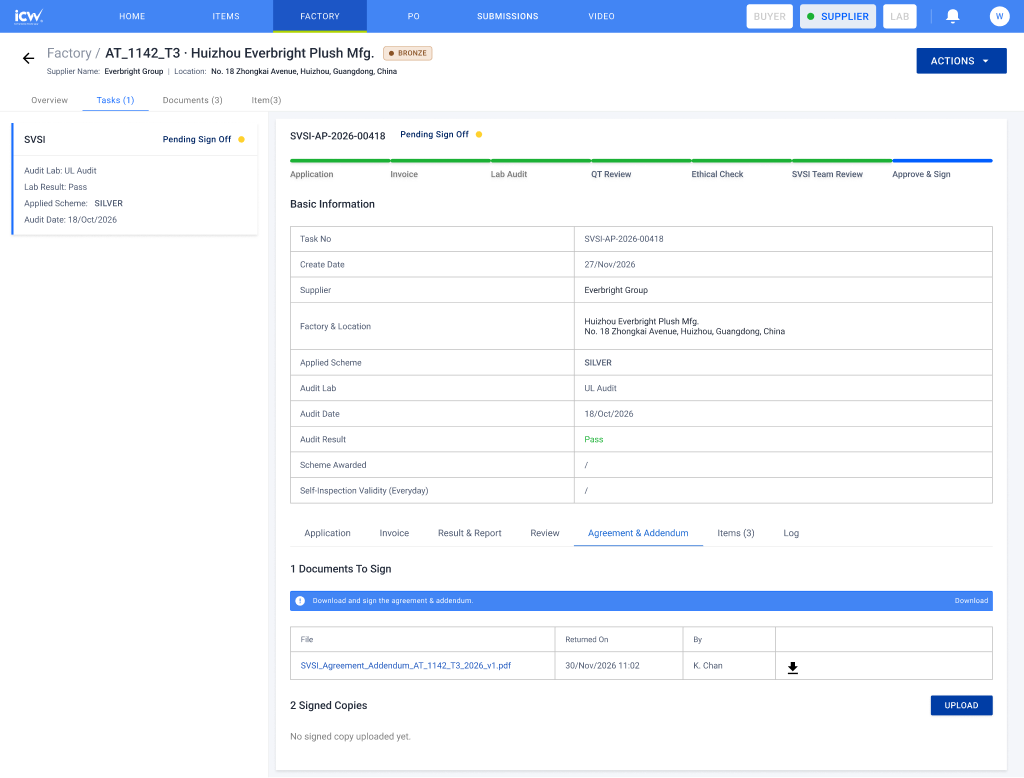
Pending sign off
Sent automatically when the SVSI team confirms. Upload opens the signed-copy dialog.
Open in Figma 1656:22338QT Final Review & Complete
The signed copies come back to QT at Final Review (QT). QT uploads the countersigned copy; a dialog then offers Complete task right away, or Confirm later from the task page. That closes the task, awards the tier and makes the self-inspection validity date live. Before the validity start date the factory still uses third-party inspection.
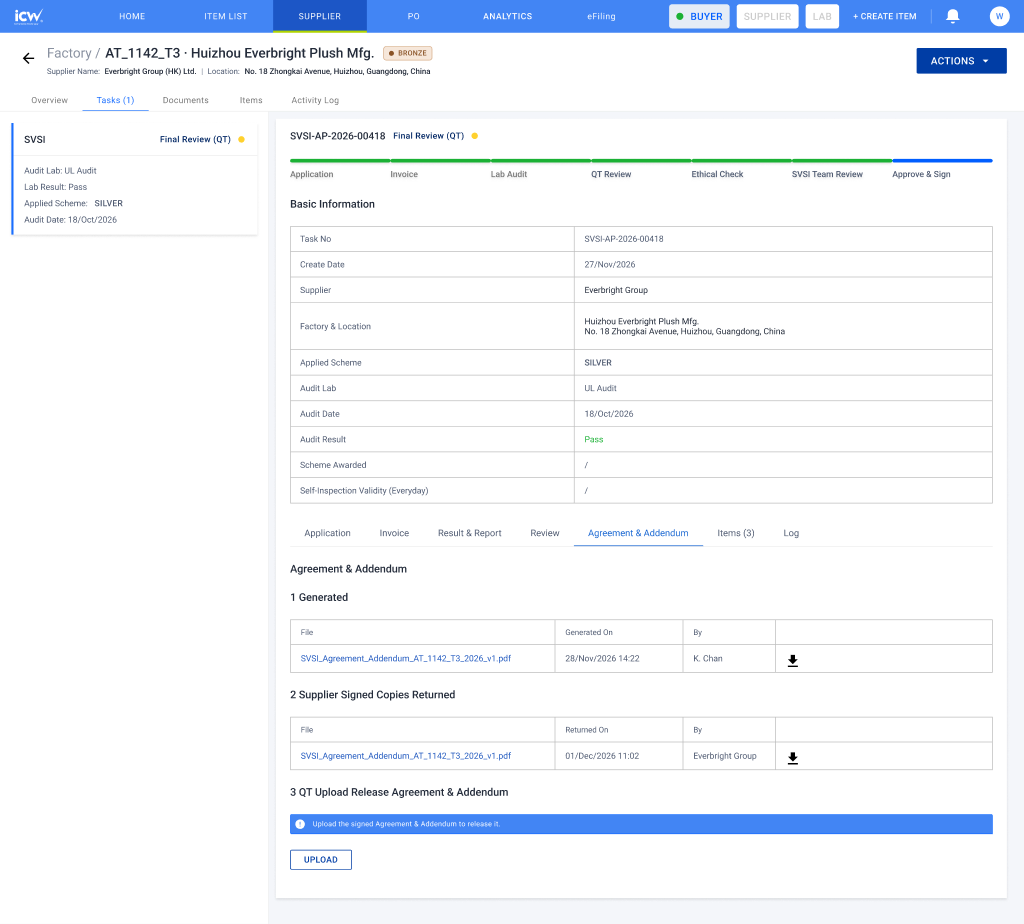
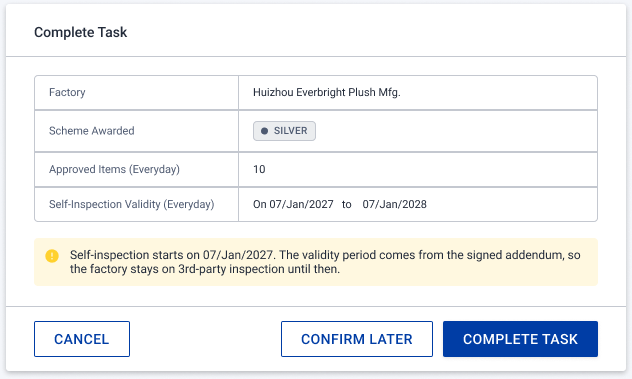
Complete now or later
Right after QT uploads the signed copy: complete the task now, or choose Confirm later and finish from the task page.
Open in Figma 5415:46438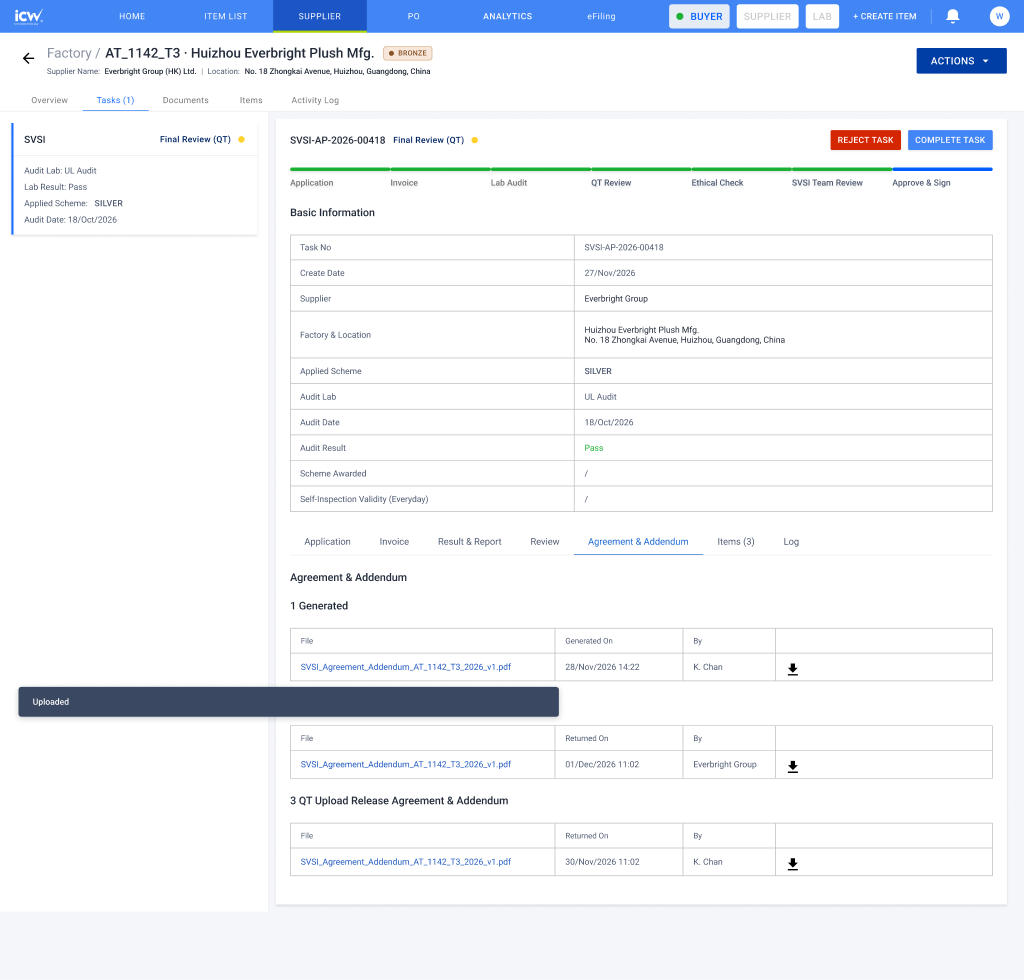
Complete task
Complete Task asks for confirmation, because the tier and the validity window cannot be changed afterwards.
Open in Figma 1654:21831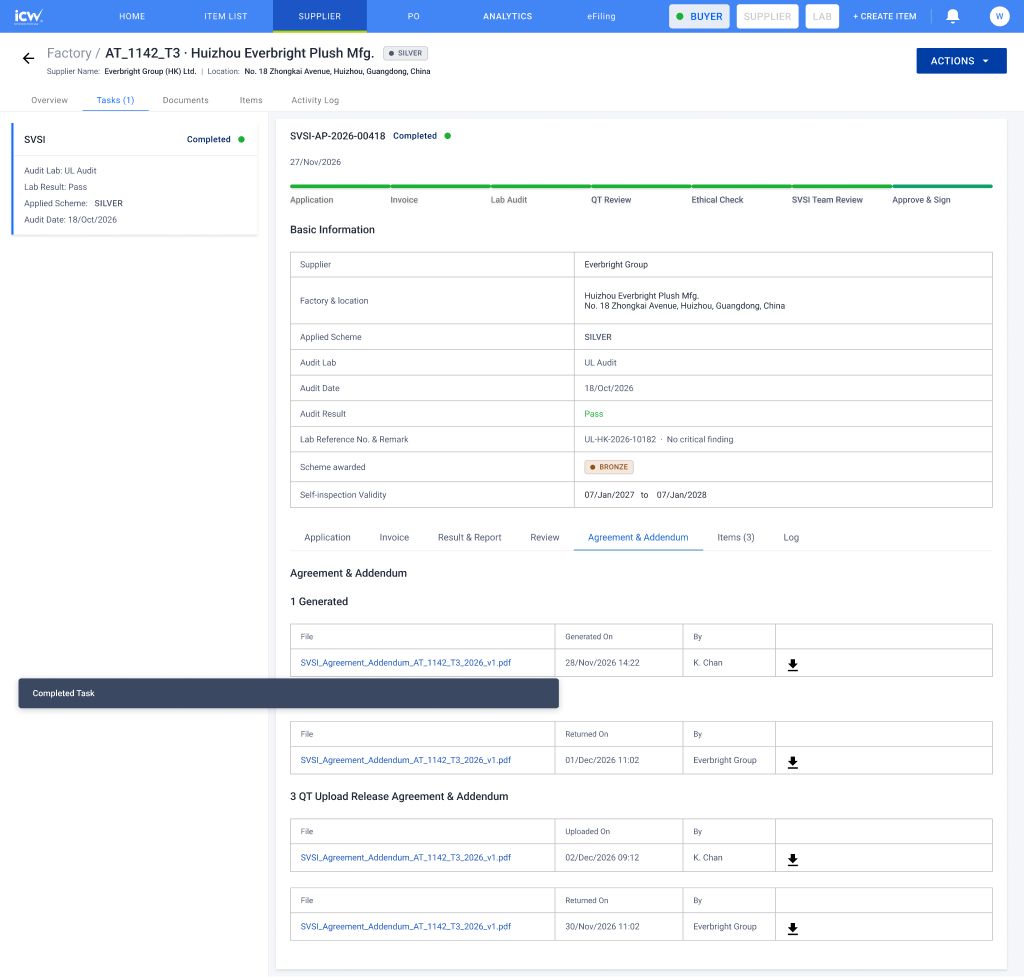
Completed
The factory's scheme is awarded and the validity dates appear on the factory record.
Open in Figma 1656:22657Reference
The scheme ladder is a factory ladder
Products never carry a tier. They carry only New or Repeat.
| Tier | How a factory gets there | UL assessment | New item uploads | Repeat item uploads |
|---|---|---|---|---|
| BRONZE | First year in the programme | Required | Report + Addendum | — |
| SILVER | One good year at Bronze | Required | Report + Addendum | Report + Addendum |
| GOLD | One good year at Silver | Not required | Report + Addendum | Addendum only |
So a Silver factory with a Repeat product still goes through the full lab flow. Repeat only lightens the document burden, and only at Gold does it drop the self-inspection report. An item graduates to Repeat by staying in the Addendum; drop it for a year and it comes back as New.
What the two documents actually ask for
Read from the Word originals, not the scans. The highlighted placeholders are real content controls.
| Document | Level | Fields | Notable |
|---|---|---|---|
| Agreement v6 | Supplier first year only | 13 controls | The effective date is four dropdowns (day / month / two year digits) and is repeated as a date picker in clause 13. The MSTA date in the recitals is a field too. |
| Addendum v3.1 | Factory renewed annually | 169 controls | Carries four product tables: Everyday / GNFR at item level with WIC number, Seasonal at category level with no WIC, and a separate Gold-repeat table for each. Only one dropdown in the whole document: the awarded scheme. |
Open questions for the team
Things the design cannot settle on its own.
- What can TBG do with each scheme?The scheme tabs (Not Rated, Bronze, Silver, Gold, Out of Scope) filter the list today. Once a tier is picked, which actions should each one offer?
- How should the Factory and Supplier tables sort?Supplier by name A to Z and Factory by SVSI Task Status, or a Create Date column on both, latest first, like the Audit List.
- Seasonal items are picked per WIC but written per category.The item list selects Seasonal items individually; the Addendum lists Seasonal only as a Product Category. Is that roll-up automatic, or does the buyer choose the categories again when generating?
- Validity starts from the Addendum Effective Date, not the completion date.In the signed Greatstar example both fall on the same day. If they can differ, which one drives the validity window?
- Lab wording is still UL-specific in places."UL Audit" and "Factory previous UL assessment date" remain, but BV can now be selected, so these need neutral wording or a rule.